2 hours until Demo deadline, Laptop rebuilt, Demo system halfway up...
it's going to be a close call...
Thursday, December 22, 2005
The race against time....

Just what I felt like doing tonight!
Today was just a nasty day! After working on some development to replicate functionality (that works perfectly well now) that has been seriously underscoped and completely undocumented, I went to do a very significant demo today only to have my laptop die!
There is really nothing like "Windows could not start" message to really brighten up your day. After spending about 20mins on the customers site trying to fix it we decided that it just wasn't going to work. The customer kindly gave us until 12pm to do the demo which means rebuilding my laptop tonight. (personally this close to Christmas I doubt seeing the product for the 5th time was really going to make that much difference, but apparenlty it is)
With most of the windows system32 directory corrupt and the harddrive running slower than any 3 1/4 I remember, I'm putting my money on it being the HDD. I've currently reinstalled windows onto a spare HDD and got the system up and running. Now it's the joy of trying to get the data back off my old drive.
So far I'm about 5 hours into the reinstall - restore process with no clear light at the end of the tunnel... I just hope I can stay awake for the demo!
There is really nothing like "Windows could not start" message to really brighten up your day. After spending about 20mins on the customers site trying to fix it we decided that it just wasn't going to work. The customer kindly gave us until 12pm to do the demo which means rebuilding my laptop tonight. (personally this close to Christmas I doubt seeing the product for the 5th time was really going to make that much difference, but apparenlty it is)
With most of the windows system32 directory corrupt and the harddrive running slower than any 3 1/4 I remember, I'm putting my money on it being the HDD. I've currently reinstalled windows onto a spare HDD and got the system up and running. Now it's the joy of trying to get the data back off my old drive.
So far I'm about 5 hours into the reinstall - restore process with no clear light at the end of the tunnel... I just hope I can stay awake for the demo!
Wednesday, December 21, 2005
It's almost christmas
It's a little hard to believe that go a few days it will be christmas already! It has really snuck up on me this year. I've hardly got any of the presents that i need! Fortunately the shops are open until 9pm for the next three nights. One of the reasons I haven't got around to the shopping is the huge amount of work that is on at the moment! Normally i'd be expecting everything to be easing off, but there is just as much work on now (if not more) than every other month of the year! However once friday rolls around i'll be go cruise mode! It y'll be nice to get some quality time with the consoles. On a less festive note i tried to remove the little toe of my left foot last night. Ended up only taking the toe-nail off on the vacuum. Still, it will make the trip to the coast next week interesting
Tuesday, December 20, 2005
Feeling just a little silly
After being frustrated by the Blue light on the new Toshiba SD-350E, I ended up posting on the aus.audio-visual.home-cinema forums. After a few options on electrical tape and colouring in the light, someone finally pointed out that it's in the manual :)
In my defense it's in a really stupid spot, both in the manual and the menu system. So to save other people the confusion here is How to dim the blue light on a Toshiba SD-350E.
1. Turn on the player with no Disc
2. Press the Setup button on the remote
3. Press the > button until you have selected the Rating option
4. Press the Enter button
5. In the Rating Menu select FL. Dimmer and press Enter
6. Select either Dim or Off
This will switch off the light on the front panel.
The only downside is that it doesn't seem to remember the setting once you turn the player off. Oh well back to the drawing board (and feeling silly)
In my defense it's in a really stupid spot, both in the manual and the menu system. So to save other people the confusion here is How to dim the blue light on a Toshiba SD-350E.
1. Turn on the player with no Disc
2. Press the Setup button on the remote
3. Press the > button until you have selected the Rating option
4. Press the Enter button
5. In the Rating Menu select FL. Dimmer and press Enter
6. Select either Dim or Off
This will switch off the light on the front panel.
The only downside is that it doesn't seem to remember the setting once you turn the player off. Oh well back to the drawing board (and feeling silly)
Friday, December 16, 2005
Yay!!!! More Early Christmas Presents
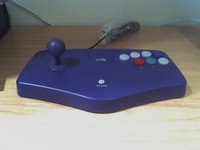 I got a wonderful little package on my desk this morning from Lik Sang! I'd ordered a couple of copies of Puzzle Bobble for the DS back at the start of November with a few other bits and bobs. But as the game has now been delayed until March (at least at Lik Sang) I pulled the game out of the order so everything else would ship. I got the notification yesterday that the items had shipped, but considering it's christmas I hardly expected to get the package today! The best bit is it included a couple of PowerStick Arcade controllers for the GameCube also with a few other free trinkets that they threw in for Christmas! (aw, ain't that nice)
Now I'm set for arcade games on both my Xbox and GameCube! Bring on the Christmas holiday arcade action I say! (Unfortunately I have about a weeks worth of work to finish by the end of the weekend so I don't think I'll be getting much gaming action in then)
Thursday, December 15, 2005
Think sharks are cool?
Well they get owned by octipi! The things you find while waiting for an ITSM change to commit. This is a video of a Shark being taken by an octopus! Looks like fins are the only thing to get worried about in the surf!
Wednesday, December 14, 2005
Upgrade Two for the week - Toshiba SD-350E
Last night the lack of a DVD player was rectified at one of the big pre-Christmas sales. The decision basically came down to where I wanted Picture quality or Sound Quality in Multichannel audio. As I don't listen to any Multichannel music the clear choice was the Toshiba. With the minimal amount of bargaining I secured a unit for $235.

This is a run down of the player:-
The setup when I got home was fairly easy, I simply removed all the cables from the Onkyo and plugged in the Toshiba, the first thing I noticed was the lack of an S-Video socket on the back of the unit. I guess with the inclusion of the HDMI it's assumed that no one will be using this player less than Component Quality.
The other connector that is missing is an optical audio connector, not too much of an issue for me as I already had IXOS XHD-608-100 co-axial interconnect carrying the audio for the Onkyo, bit of a pain if your amp only had a few (or no) co-axial inputs.
This brings me to the second point, included as an addendum to the manual is a sheet of paper indicating that the system is configured for composite video only and will need to be setup in the menu to accept Component video. A strange point considering the lack of connectors. The setup process for that was also straight forward.
After the configuration for the video output there were some extra steps which basically setup the player for region free. The box is clearly mark "This Player is Region 4 only" yet the manual states (and is correct) that this player is setup for Region 2. The instructions included on the sheet however do make it region free. Again a bit of an annoyance as this could have been easily changed at the factory before they shipped.

 Once the player was setup though the images were just gorgeous, I spun up The Incredibles and the images were just crystal clear with vibrant colours. Every scene just jumped off the screen with a realism that I hadn't previously seen with this movie. The level of detail of the chase through the island was just astonoshing.
We also had a run of an old favourite Sleepy Hollow which showed exactly how much detail this player could produce even from an old disc. Some of the close up shots on Christina Ricci showed just how much white makeup had been plastered on.
The sound was also surprisingly good with a noticeable amount of bass weight that I hadn't heard from the discs before. There wasn't too much judging to be done on the surround steering as I still don't have a full surround setup mounted.
My only real gripe with the player is the blue light that illuminates the drive slot when the disk is inserted. There is no way I can find (as yet) to turn it off which makes it a bit annoying in the front of my cabinet.
I couldn't be happier with the picture, it is definitely a step above the Onkyo and that's before using the HDMI or upscaling. If you're looking for a DVD player upgrade and you have a display with HDMI it's definitely worth looking into.
This is a run down of the player:-
The setup when I got home was fairly easy, I simply removed all the cables from the Onkyo and plugged in the Toshiba, the first thing I noticed was the lack of an S-Video socket on the back of the unit. I guess with the inclusion of the HDMI it's assumed that no one will be using this player less than Component Quality.
The other connector that is missing is an optical audio connector, not too much of an issue for me as I already had IXOS XHD-608-100 co-axial interconnect carrying the audio for the Onkyo, bit of a pain if your amp only had a few (or no) co-axial inputs.
This brings me to the second point, included as an addendum to the manual is a sheet of paper indicating that the system is configured for composite video only and will need to be setup in the menu to accept Component video. A strange point considering the lack of connectors. The setup process for that was also straight forward.
After the configuration for the video output there were some extra steps which basically setup the player for region free. The box is clearly mark "This Player is Region 4 only" yet the manual states (and is correct) that this player is setup for Region 2. The instructions included on the sheet however do make it region free. Again a bit of an annoyance as this could have been easily changed at the factory before they shipped.
Once the player was setup though the images were just gorgeous, I spun up The Incredibles and the images were just crystal clear with vibrant colours. Every scene just jumped off the screen with a realism that I hadn't previously seen with this movie. The level of detail of the chase through the island was just astonoshing.We also had a run of an old favourite Sleepy Hollow which showed exactly how much detail this player could produce even from an old disc. Some of the close up shots on Christina Ricci showed just how much white makeup had been plastered on.
The sound was also surprisingly good with a noticeable amount of bass weight that I hadn't heard from the discs before. There wasn't too much judging to be done on the surround steering as I still don't have a full surround setup mounted.
My only real gripe with the player is the blue light that illuminates the drive slot when the disk is inserted. There is no way I can find (as yet) to turn it off which makes it a bit annoying in the front of my cabinet.
I couldn't be happier with the picture, it is definitely a step above the Onkyo and that's before using the HDMI or upscaling. If you're looking for a DVD player upgrade and you have a display with HDMI it's definitely worth looking into.
Tuesday, December 13, 2005
Post worthy...
After a long absence Tom has made a triumphant return with two posts on the one day! Nice to have you back!
Subscribe to:
Posts (Atom)